

GPU Programming is rarely discussed in mainstream discussions of GPUs and their performance. Yes, people will discuss things like ray-tracing or fps, but the general consumer does not understand, nor care about, the developer ecosystem behind what GPU you choose.
Why GPU?
In a traditional CPU-based programming language, you are constrained to using only a limited number of cores. This means, even with multi-threading, if you were to make thousands and thousands of mathematical calculations, you’d need to loop through chunks on a limited number of threads, such as this
Credit to Apple for the example
void add_arrays(const float* inA,
                const float* inB,
                float* result,
                int length)
{
    for (int index = 0; index < length ; index++)
    {
        result[index] = inA[index] + inB[index];
    }
}
Now, if we were to move this code to the GPU, we would get a massive benefit: multiply the number of threads the code has access to. Rather than a few large cores, GPUs have thousands of smaller cores.
kernel void add_arrays(device const float* inA,
                       device const float* inB,
                       device float* result,
                       uint index [[thread_position_in_grid]])
{
    // the for-loop is replaced with a collection of threads, each of which
    // calls this function.
    result[index] = inA[index] + inB[index];
}
This new function has introduced a couple of differences, mainly syntax-related (metal requires some keywords like “kernel” and “device”), but another important difference is the index keyword. Simple computations like addition can run on every single thread at the same time rather than having to be looped through.
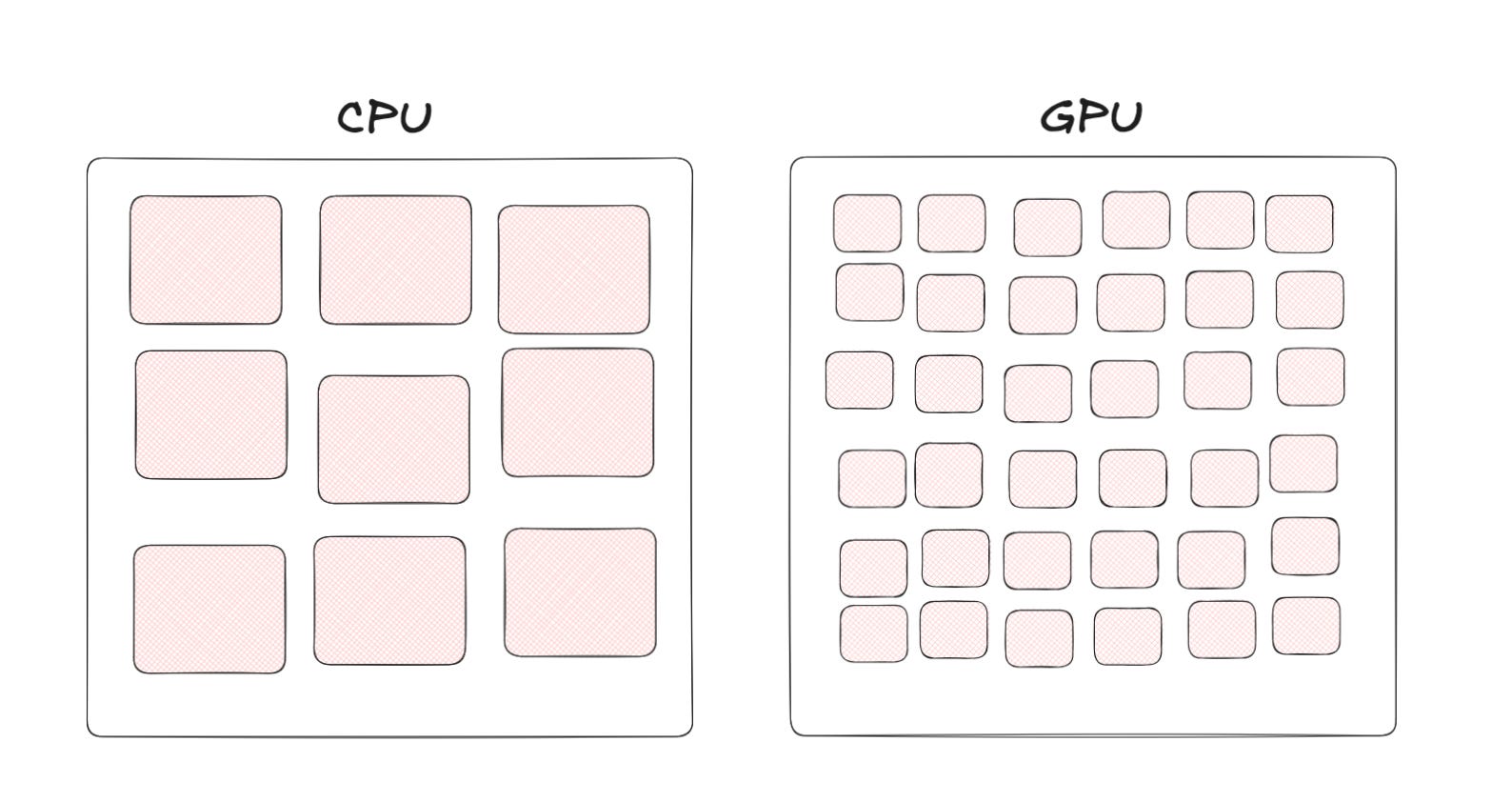
You can see why AI models choose to run on the GPU; they require large amounts of simple computations that can be easily computed hundreds of times in a single second (how games can render at 60 frames per second).
Limitations
Now, there are some shortfalls associated with it; after all, there’s a reason everyone doesn’t just move their code to the GPU.
Latency
In the previous example, we saw how it’s used for addition. Now addition is fairly simple computationally, but for further difficult operations, the amount of time it takes in a single instance is longer. To clarify, if you only had to add one pair of numbers, it would always be faster on the CPU than the GPU. Now, if we wanted to add multiple thousands of pairs (like in our previous example), a GPU would come much farther ahead. This is why GPUs are used when throughput is more important than latency.
Another latency issue is how memory is handled. Let’s say you’re making a program to search for text through hundreds of documents. If your code has multiple threads reading content into a buffer and then processing it, it is inefficient to do so on the GPU. Instead, the memory needs to be uploaded to the GPU manually to be processed. Again, great for high-throughput applications like video games and data science, where data needs to be read once and then processed often, but poor for applications with high disk reads like web servers, where data needs to be fetched.
Cross-platform issues
Unlike the portability of C, Go, or most other languages, GPU programming languages are so dependent on hardware that each company has its own language.
For NVIDIA, there’s CUDA. It’s the most popular and has the most mature ecosystem, resulting in companies spending more resources on it (TensorFlow only supports CUDA, with a separate fork for AMD’s ROCm). This is why AI models perform much better on NVIDIA, and also why there’s a cycle of NVIDIA receiving more money due to CUDA’s maturity, and CUDA getting more mature because of the money flowing into it.
Then, as I briefly mentioned, AMD has ROCm. Unlike CUDA, it is an open-source software stack. Another awesome feature is HIP (Heterogeneous-computing Interface for Portability), which is the runtime behind it that allows all its code to work on any GPU. This is why, if you use HIP features, you have cross-platform compatibility.
There’s also Metal for Mac and iPhones, but there’s not much to say other than it’s by Apple, for Apple.
Lastly, there’s OpenCL, the thing that introduced me to GPU programming. OpenCL sounds similar to OpenGL (the thing that runs Minecraft), and it’s because it’s by the same organization. OpenCL is open-source and compatible on most platforms. What it provides is a cross-platform language that then runs the hardware native functions underneath, so you write OpenCL that then runs CUDA.
Get started with hipThreads
This unique paradigm of thinking gives way to some new ways to think about problem-solving. You technically already use it if you use TensorFlow or PyTorch, as they use CUDA libraries behind the scenes.
Switching an application from traditional C++ to OpenCL is a complicated effort. Here’s a Hello World example to show the amount of extra code required to interop between CPU and GPU. Again, this is a barrier to shifting code from the CPU to GPU.
Last month, AMD unveiled hipThreads, a C++ library that leverages HIP to very easily shift code from the CPU to GPU. Let’s discuss the example AMD shows because they detailed the performance boosts.
The following is a code block that creates a bunch of regular threads and divides the work among the other cores available. This should be familiar; it just uses the regular C++ “std::threads” to compute the work.
#include <thread>
#include <vector>

#define N 0x10000000U
#define NUM_ITERATIONS 512

int main() {
    std::vector<float> x(N, 1.0F);
    std::vector<float> y(N, 2.0F);
    const float alpha = 2.0F;

    std::vector<std::thread> threads(std::thread::hardware_concurrency());

    for (unsigned int i = 0; i < threads.size(); ++i) {
        size_t chunk_size = (i < N % threads.size()) ? (N / threads.size() + 1) : (N / threads.size());
        size_t offset =     (i < N % threads.size()) ? (i * chunk_size)         : (i * chunk_size + N % threads.size());

        threads[i] = std::thread(
            [] (uint32_t n, float a, const float *x, float *y) {
                for (uint32_t i = 0; i < n; ++i) {
                    float t = x[i];
                    #pragma clang loop unroll(full)
                    for (int j = 0; j < NUM_ITERATIONS; ++j) {
                        t = a * t + y[i];
                    }
                    y[i] = t;
                }
            },
            chunk_size, alpha, x.data() + offset, y.data() + offset);
    }

    for (auto &t : threads) {
        t.join();
    }

    return 0;
}
Now, to make it work on the GPU, let’s replace it with hip::threads. This automatically should make it faster, but there’s more changes you can make to improve it. I recommend you read the original article.
#include <hip/thread>
#include <thrust/unique_ptr.h>
#include <thrust/copy.h>
#include <vector>

#define N 0x10000000U
#define NUM_ITERATIONS 512

int main() {
    // Create and initialize vectors on the host
    std::vector<float> x_host(N, 1.0F);
    std::vector<float> y_host(N, 2.0F);
    const float alpha = 2.0F;

    // Allocate device memory and copy data to GPU
    thrust::unique_ptr<float[]> x = thrust::make_unique<float[]>(N);
    thrust::unique_ptr<float[]> y = thrust::make_unique<float[]>(N);
    thrust::copy(x_host.begin(), x_host.end(), x.get());
    thrust::copy(y_host.begin(), y_host.end(), y.get());

    { // hip::thread scope starts here
        std::vector<hip::thread> threads(hip::thread::hardware_concurrency());

        for (unsigned int i = 0; i < threads.size(); ++i) {
            size_t chunk_size = (i < N % threads.size()) ? (N / threads.size() + 1) : (N / threads.size());
            size_t offset =     (i < N % threads.size()) ? (i * chunk_size)         : (i * chunk_size + N % threads.size());

            threads[i] = hip::thread(
                [] __device__(uint32_t n, float a, const float *x, float *y) {
                    for (uint32_t i = 0; i < n; ++i) {
                        float t = x[i];
                        for (int j = 0; j < NUM_ITERATIONS; ++j) {
                            t = a * t + y[i];
                        }
                        y[i] = t;
                    }
                },
                chunk_size, alpha, x.get_raw() + offset, y.get_raw() + offset);
        }

        for (auto &t : threads) {
            t.join();
        }
    } // hip::thread scope ends here

    // Copy results back from GPU to host if necessary
    thrust::copy(y.get(), y.get() + N, y_host.begin());

    return 0;
}
You can see all the patterns I discussed being implemented here. First, the data is copied into something that can be passed to the GPU with the following code
// Allocate device memory and copy data to GPU
thrust::unique_ptr<float[]> x = thrust::make_unique<float[]>(N);
thrust::unique_ptr<float[]> y = thrust::make_unique<float[]>(N);
thrust::copy(x_host.begin(), x_host.end(), x.get());
thrust::copy(y_host.begin(), y_host.end(), y.get());
Another pattern difference is that for HIP, the library first launches a kernel on the GPU and then sends workers over. This reduces per-instruction latency since the kernel has already been launched.
Then every std::thread is replaced with hip::thread, and voila, the code now runs on the GPU. It’s a really neat library, and I’m excited to work on a project with it.
Here’s the performance difference observed by AMD
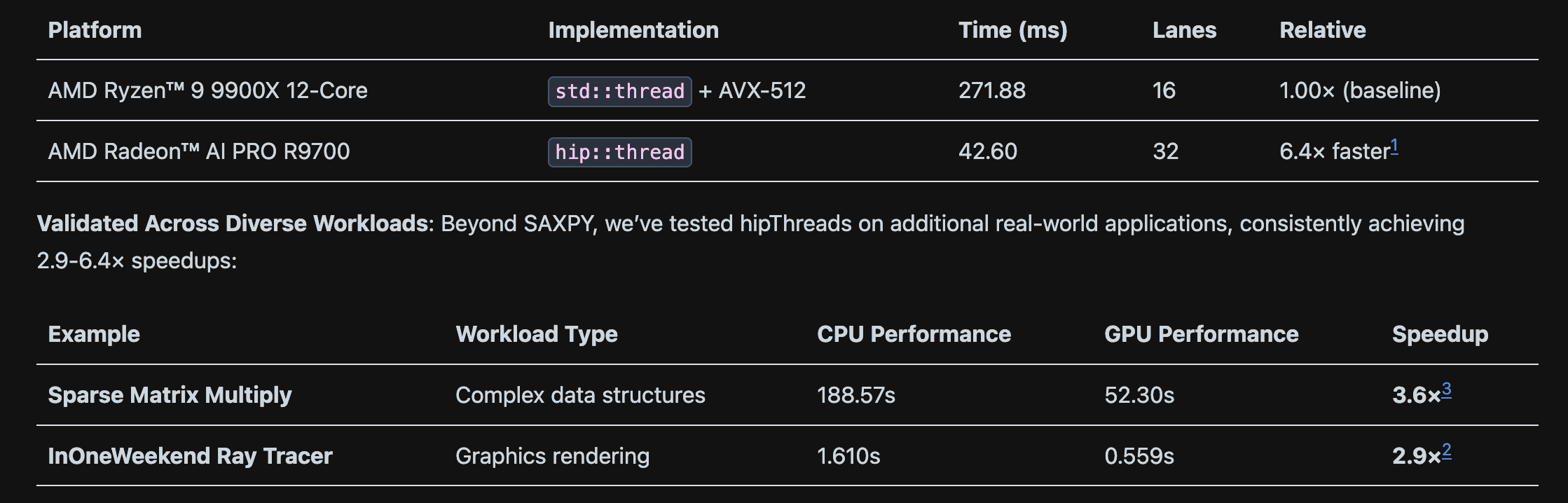
GPU Programming involves new ways of thinking to fully optimize for libraries like maths and physics simulations (like PhysX). They are essential for making applications run a single function over large datasets hundreds of times per second. Hope you learned something, and feel free to drop a question in the comments if you want to discuss something further!